System Hardening Analysis
As previously seen in the Boot and Runtime Analysis chapter, a root shell was obtained via UART. Therefore, an assessment of the device’s internal security posture was conducted from the perspective of an attacker who has gained local access to the target. This process, commonly referred to as System hardening analysis, evaluates the running system’s configuration against established security best practices. The following sections document the findings obtained from this analysis.
Boot behaviour
Boot behaviour of the target was previously observed in the Boot and Runtime Analysis chapter. This was previously done since interruption of the boot process was required in order to enable firmware extraction and its subsequent analysis.
Process analysis
The running processes were enumerated using the ps command from the UART root shell. The full output is presented below.
# ps
  PID  Uid     VmSize Stat Command
    1 root        400 S   init
    2 root            SW< [kthreadd]
    3 root            SW< [ksoftirqd/0]
    4 root            SW< [events/0]
    5 root            SW< [khelper]
    6 root            SW< [async/mgr]
    7 root            SW< [kblockd/0]
    8 root            SW  [pdflush]
    9 root            SW  [pdflush]
   10 root            SW< [kswapd0]
   11 root            SW< [aio/0]
   18 root            SW< [mtdblockd]
   19 root            SW< [unlzma/0]
   73 root       2872 S   /usr/bin/httpd
   74 root       1776 S   /usr/bin/uclited
   80 root        524 R   -sh
   82 root        208 S   ipcserver
   86 root       2872 S   /usr/bin/httpd
   87 root       2872 S   /usr/bin/httpd
  100 root        336 S   syslogd -C -l 7
  104 root        296 S   klogd
  131 root            SW< [napt_ct_scan]
  285 root        352 S   /sbin/udhcpc -h Archer_C7 -i eth0.2 -p /tmp/wr841n/ud
  286 root        196 S   /sbin/udhcpc -h Archer_C7 -i eth0.2 -p /tmp/wr841n/ud
  290 root        324 S   /usr/sbin/udhcpd /tmp/wr841n/udhcpd.conf
  323 root       2872 S   /usr/bin/httpd
  336 root       2872 S   /usr/bin/httpd
  337 root       2872 S   /usr/bin/httpd
  418 root       2872 S   /usr/bin/httpd
  420 root       2872 S   /usr/bin/httpd
  421 root       2872 S   /usr/bin/httpd
  422 root       2872 S   /usr/bin/httpd
  473 root        564 S   hostapd -B /tmp/topology_ath0.conf
  476 root       2872 S   /usr/bin/httpd
  481 root       2872 S   /usr/bin/httpd
  549 root        540 S   hostapd -B /tmp/topology_5G_ath1.conf
  552 root       2872 S   /usr/bin/httpd
  557 root       2872 S   /usr/bin/httpd
  564 root       2872 S   /usr/bin/httpd
  566 root        228 S   tphotplug -u 2
  567 root       2872 S   /usr/bin/httpd
  580 root            SW< [khubd]
  599 root            SW  [ telnetDBGD ]
  600 root            SW  [ acktelnetDBGD ]
  602 root            SW  [NU TCP]
  603 root            SW  [NU UDP]
  635 root       2872 S   /usr/bin/httpd
  640 root       2872 S   /usr/bin/httpd
  642 root        328 S   /usr/sbin/dnsproxy
  644 root       2872 S   /usr/bin/httpd
  645 root       2872 S   /usr/bin/httpd
  646 root       2872 S   /usr/bin/httpd
  647 root       2872 S   /usr/bin/httpd
  649 root       2872 S   /usr/bin/httpd
  655 root       2872 S   /usr/bin/httpd
  663 root        300 S   /usr/bin/lld2d br0 ath0
  669 root        348 S   /usr/bin/dropbear -p 22 -r /tmp/dropbear/dropbear_rsa
  709 root        408 R   ps
The most significant observation is that every process on the system runs under the root user account. This includes all userspace services such as the web server (httpd), DHCP client and server (udhcpc, udhcpd), SSH daemon (dropbear), DNS proxy (dnsproxy), and wireless daemon (hostapd). The absence of any privilege separation means that a vulnerability in any single service would immediately yield root-level access to the target, with no further privilege escalation required. This has been added as finding INFO-09.
Notable processes identified include:
/usr/bin/httpd: the web interface daemon, running as approximately 15 concurrent instances, all as root/usr/bin/dropbear: SSH daemon listening on port 22/usr/bin/uclited: TP-Link cloud management daemonhostapd: wireless access point daemon for both 2.4GHz and 5GHz radios[ telnetDBGD ]and[ acktelnetDBGD ]: kernel threads suggesting a debug telnet interface built into the kernel, the purpose and accessibility of which warrants further investigation[NU TCP]and[NU UDP]: unidentified kernel threads, likely TP-Link proprietary network utilities
Network interfaces
The network interfaces present on the device were enumerated using ifconfig from the UART root shell. The output of this command is detailed below.
# ifconfig
ath0      Link encap:Ethernet  HWaddr C4:6E:1F:AA:1E:56
          inet6 addr: fe80::c66e:1fff:feaa:1e56/64 Scope:Link
          UP BROADCAST RUNNING MULTICAST  MTU:1500  Metric:1
          RX packets:0 errors:0 dropped:0 overruns:0 frame:0
          TX packets:0 errors:0 dropped:116 overruns:0 carrier:0
          collisions:0 txqueuelen:0
          RX bytes:0 (0.0 B)  TX bytes:0 (0.0 B)

ath1      Link encap:Ethernet  HWaddr C4:6E:1F:AA:1E:55
          inet6 addr: fe80::c66e:1fff:feaa:1e55/64 Scope:Link
          UP BROADCAST RUNNING MULTICAST  MTU:1500  Metric:1
          RX packets:0 errors:0 dropped:0 overruns:0 frame:0
          TX packets:0 errors:0 dropped:0 overruns:0 carrier:0
          collisions:0 txqueuelen:0
          RX bytes:0 (0.0 B)  TX bytes:0 (0.0 B)

br0       Link encap:Ethernet  HWaddr C4:6E:1F:AA:1E:56
          inet addr:192.168.0.1  Bcast:192.168.0.255  Mask:255.255.255.0
          inet6 addr: fe80::c66e:1fff:feaa:1e56/64 Scope:Link
          UP BROADCAST RUNNING MULTICAST  MTU:1500  Metric:1
          RX packets:42 errors:0 dropped:0 overruns:0 frame:0
          TX packets:107 errors:0 dropped:0 overruns:0 carrier:0
          collisions:0 txqueuelen:0
          RX bytes:2290 (2.2 KiB)  TX bytes:31995 (31.2 KiB)

br1       Link encap:Ethernet  HWaddr C4:6E:1F:AA:1E:58
          inet6 addr: fe80::c66e:1fff:feaa:1e58/64 Scope:Link
          UP BROADCAST RUNNING MULTICAST  MTU:1500  Metric:1
          RX packets:80 errors:0 dropped:0 overruns:0 frame:0
          TX packets:8 errors:0 dropped:0 overruns:0 carrier:0
          collisions:0 txqueuelen:0
          RX bytes:21349 (20.8 KiB)  TX bytes:688 (688.0 B)

eth0      Link encap:Ethernet  HWaddr C4:6E:1F:AA:1E:55
          inet6 addr: fe80::c66e:1fff:feaa:1e55/64 Scope:Link
          UP BROADCAST RUNNING MULTICAST  MTU:1500  Metric:1
          RX packets:42 errors:0 dropped:0 overruns:0 frame:0
          TX packets:90 errors:0 dropped:0 overruns:0 carrier:0
          collisions:0 txqueuelen:1000
          RX bytes:3214 (3.1 KiB)  TX bytes:27077 (26.4 KiB)

eth0.1    Link encap:Ethernet  HWaddr C4:6E:1F:AA:1E:56
          inet6 addr: fe80::c66e:1fff:feaa:1e56/64 Scope:Link
          UP BROADCAST RUNNING MULTICAST  MTU:1500  Metric:1
          RX packets:42 errors:0 dropped:0 overruns:0 frame:0
          TX packets:115 errors:0 dropped:0 overruns:0 carrier:0
          collisions:0 txqueuelen:0
          RX bytes:2458 (2.4 KiB)  TX bytes:33143 (32.3 KiB)

eth0.2    Link encap:Ethernet  HWaddr C4:6E:1F:AA:1E:57
          inet6 addr: fe80::c66e:1fff:feaa:1e57/64 Scope:Link
          UP BROADCAST RUNNING MULTICAST  MTU:1500  Metric:1
          RX packets:0 errors:0 dropped:0 overruns:0 frame:0
          TX packets:19 errors:0 dropped:0 overruns:0 carrier:0
          collisions:0 txqueuelen:0
          RX bytes:0 (0.0 B)  TX bytes:7254 (7.0 KiB)

eth1      Link encap:Ethernet  HWaddr C4:6E:1F:AA:1E:58
          inet6 addr: fe80::c66e:1fff:feaa:1e58/64 Scope:Link
          UP BROADCAST RUNNING MULTICAST  MTU:1500  Metric:1
          RX packets:80 errors:0 dropped:0 overruns:0 frame:0
          TX packets:54 errors:0 dropped:0 overruns:0 carrier:0
          collisions:0 txqueuelen:1000
          RX bytes:22789 (22.2 KiB)  TX bytes:3814 (3.7 KiB)

lo        Link encap:Local Loopback
          inet addr:127.0.0.1  Mask:255.0.0.0
          inet6 addr: ::1/128 Scope:Host
          UP LOOPBACK RUNNING  MTU:16436  Metric:1
          RX packets:0 errors:0 dropped:0 overruns:0 frame:0
          TX packets:0 errors:0 dropped:0 overruns:0 carrier:0
          collisions:0 txqueuelen:0
          RX bytes:0 (0.0 B)  TX bytes:0 (0.0 B)

wifi0     Link encap:Ethernet  HWaddr C4:6E:1F:AA:1E:56
          inet6 addr: fe80::c66e:1fff:feaa:1e56/64 Scope:Link
          UP BROADCAST RUNNING MULTICAST  MTU:1500  Metric:1
          RX packets:1388 errors:0 dropped:0 overruns:0 frame:0
          TX packets:1210 errors:0 dropped:0 overruns:0 carrier:0
          collisions:0 txqueuelen:511
          RX bytes:0 (0.0 B)  TX bytes:0 (0.0 B)
          Interrupt:2 Memory:b8100000-b811ffff

wifi1     Link encap:Ethernet  HWaddr C4:6E:1F:AA:1E:55
          inet6 addr: fe80::c66e:1fff:feaa:1e55/64 Scope:Link
          UP BROADCAST RUNNING MULTICAST  MTU:1500  Metric:1
          RX packets:0 errors:0 dropped:0 overruns:0 frame:0
          TX packets:0 errors:0 dropped:0 overruns:0 carrier:0
          collisions:0 txqueuelen:511
          RX bytes:0 (0.0 B)  TX bytes:0 (0.0 B)
          Interrupt:76 Memory:b2000000-b2200000
The device exposes a relatively complex network interface structure typical of a dual-band router. The key interfaces are:
- br0: the primary LAN bridge interface, assigned the IP address
192.168.0.1/24. This is the main management interface through which the web interface and SSH are accessible - br1: a secondary bridge interface, likely associated a guest network feature.
- eth0.1: LAN VLAN interface, bridged into
br0 - eth0.2: WAN VLAN interface, used for upstream internet connectivity
- ath0 / wifi0: 2.4GHz wireless interface
- ath1 / wifi1: 5GHz wireless interface
- lo: loopback interface at
127.0.0.1
All interfaces share MAC addresses from the same sequential block (C4:6E:1F:AA:1E:55 through C4:6E:1F:AA:1E:58), confirming they are all associated with the same physical device. Also, it must be noted that the WAN interface (eth0.2) shows no IPv4 assignment as no upstream connection was present during testing.
Kernel version
Since uname was not available on the target, the kernel version was obtained using the following command.
# cat /proc/version
Linux version 2.6.31--LSDK-9.2.0_U6.616 (root@liaozhiming)
(gcc version 4.3.3 (GCC)) #1 Sun Jan 14 10:40:16 CST 2018
As previously identified in the Automated Firmware Analysis and Manual Firmware Analysis chapters, the device runs Linux kernel version 2.6.31, built in January 2018, having been end of life for over a decade. This is associated with finding INFO-04.
BusyBox version
The BusyBox version was identified by running the binary directly.
# busybox
BusyBox v1.01 (2015.09.28-09:17+0000) multi-call binary
The device uses BusyBox version 1.01, built in September 2015. BusyBox provides the core Unix utilities available on the device and this version is severely outdated, predating the current release by over a decade. This has been added as finding INFO-10.
Password storage
Analysis of the stored password hashes in etc/shadow has been previously done in the Automated Firmware Analysis and Manual Firmware Analysis chapters.
User accounts
The /etc/passwd file was examined to identify all accounts present on the device.
# cat /etc/passwd
root:x:0:0:root:/root:/bin/sh
Admin:x:0:0:root:/root:/bin/sh
bin:x:1:1:bin:/bin:/bin/sh
daemon:x:2:2:daemon:/usr/sbin:/bin/sh
adm:x:3:4:adm:/adm:/bin/sh
lp:x:4:7:lp:/var/spool/lpd:/bin/sh
sync:x:5:0:sync:/bin:/bin/sync
shutdown:x:6:11:shutdown:/sbin:/sbin/shutdown
halt:x:7:0:halt:/sbin:/sbin/halt
uucp:x:10:14:uucp:/var/spool/uucp:/bin/sh
operator:x:11:0:Operator:/var:/bin/sh
nobody:x:65534:65534:nobody:/home:/bin/sh
ap71:x:500:0:Linux User,,,:/root:/bin/sh
dropbear:x:500:500:dropbear:/tmp/dropbear:/bin/sh
The most significant finding is that both root and Admin are assigned UID 0, meaning both accounts have full superuser privileges. This is unnecessary and violates the principle of least privilege as only one superuser account should exist on a system. Additionally, the ap71 account is assigned UID 500 but GID 0, giving it root group membership. This has been added as finding INFO-11.
Dropbear credentials file
During filesystem enumeration, a credentials file was discovered at /tmp/dropbear/dropbearpwd.
# cat /tmp/dropbear/dropbearpwd
username:admin
password:21232f297a57a5a743894a0e4a801fc3
This file contains the credentials used by the Dropbear SSH daemon for authentication, stored as an MD5 hash. The hash was submitted to an online rainbow table lookup service and cracked successfully, revealing the default admin password, as seen in the image below.
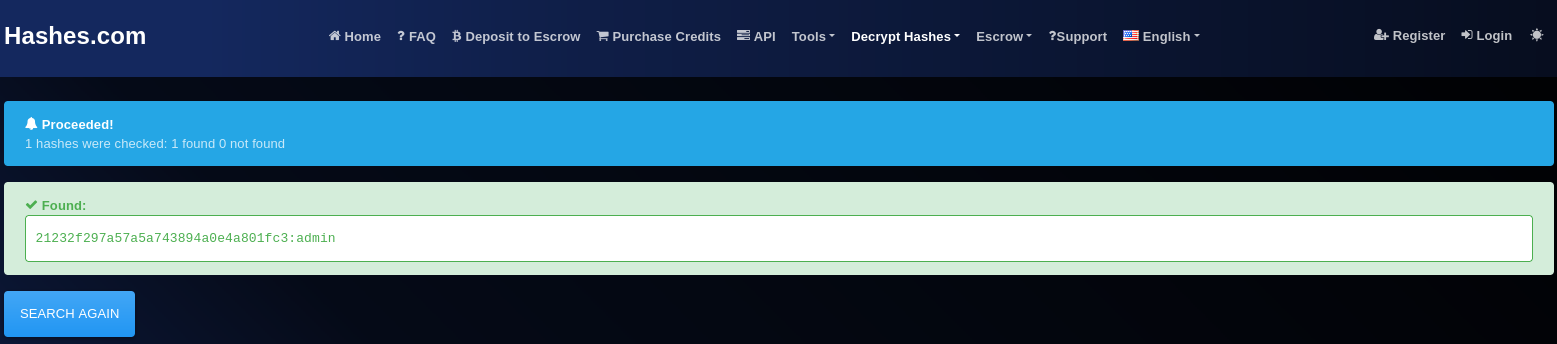
As seen, the default credential is the same as the dropbear username used for SSH daemon authentication. Furthermore, these credentials are stored as a weak, crackable MD5 hash in the world readable /tmp folder. Since the dropbear hash was found to be stored in a world readable location and was also found to be reversible, this has been added as finding INFO-12.
SSH configuration
The SSH service running on port 22 was tested from the connected PC (attacking Kali machine) with the LAN cable in place, through the following command.
┌──(lucas㉿localhost)-[~]
└─$ ssh admin@192.168.0.1
Unable to negotiate with 192.168.0.1 port 22: no matching key exchange method found. Their offer: diffie-hellman-group1-sha1,diffie-hellman-group14-sha1
As seen, the target’s SSH daemon (Dropbear) only supports weak and deprecated key exchange algorithms, specifically diffie-hellman-group1-sha1 and diffie-hellman-group14-sha1, suggesting that the SSH implementation has not been updated to support current cryptographic standards. The use of deprecated key exchange algorithms has been added as finding INFO-13.
In any case, SSH login was attempted by submitting the newly found password and enabling one of the algorithms, as seen below.
┌──(lucas㉿localhost)-[~]
└─$ ssh -oKexAlgorithms=+diffie-hellman-group1-sha1 -oHostKeyAlgorithms=+ssh-rsa admin@192.168.0.1
The authenticity of host '192.168.0.1 (192.168.0.1)' can't be established.
RSA key fingerprint is SHA256:smdELENz4Tn2fxMVoghOLMi6iQEzTSTx88r3UBeAznk.
This key is not known by any other names.
Are you sure you want to continue connecting (yes/no/[fingerprint])? yes
Warning: Permanently added '192.168.0.1' (RSA) to the list of known hosts.
admin@192.168.0.1's password:
PTY allocation request failed on channel 0
shell request failed on channel 0
Despite the found SSH credentials, SSH access was found to be rejected, failing to provide the requested shell.
Temporary filesystem contents
The /tmp directory was examined to identify runtime files and any sensitive information stored in the temporary filesystem.
# ls -la /tmp
drwxr-xr-x    9 0        0               0 Jan  1 00:00 .
drwxr-xr-x   15 0        0             200 Jan 14  2018 ..
srwxr-xr-x    1 0        0               0 Jan  1  1970 client_dhcpc
srwxr-xr-x    1 0        0               0 Jan  1  1970 client_httpd
----------    1 0        0            1928 Jan  1  1970 dec-model.conf
drwxr-xr-x    2 0        0               0 Jan  1 00:00 dev
drwxr-xr-x    2 0        0               0 Jan  1 00:00 dropbear
-rw-r--r--    1 0        0              85 Jan  1 00:00 hostapd.eap_user
-rw-r--r--    1 0        0              85 Jan  1 00:00 hostapd_5G.eap_user
srwxr-xr-x    1 0        0               0 Jan  1  1970 ipc
drwxr-xr-x    2 0        0               0 Jan  1 00:00 mediaserver
-rw-r--r--    1 0        0             511 Jan  1 00:00 passwd
prw-r--r--    1 0        0               0 Jan  1 00:00 pipe_mud80
-rw-r--r--    1 0        0              40 Jan  1 02:15 resolv.conf
-rw-r--r--    1 0        0              30 Jan  1 00:00 resolv.ipv6.conf
drwxr-xr-x    4 0        0               0 Jan  1 00:00 samba
-rw-r--r--    1 0        0            1433 Jan  1 00:00 topology_5G_ath1.conf
-rw-r--r--    1 0        0            1435 Jan  1 00:00 topology_ath0.conf
drwxr-xr-x    2 0        0               0 Jan  1 00:00 usbdisk
drwxr-xr-x    7 0        0               0 Jan  1 00:00 vsftp
-rw-r--r--    1 0        0              80 Jan  1 00:00 wlanstaticcfg
srwxr-xr-x    1 0        0               0 Jan  1 00:00 wpa_ctrl_73-1
srwxr-xr-x    1 0        0               0 Jan  1 00:00 wpa_ctrl_73-2
srwxr-xr-x    1 0        0               0 Jan  1 00:00 wpa_ctrl_73-3
srwxr-xr-x    1 0        0               0 Jan  1 00:00 wpa_ctrl_73-4
drwxr-xr-x    2 0        0               0 Jan  1 00:00 wr841n
Several observations are worth noting:
-
Sensitive files: the
/tmpdirectory contains several sensitive runtime files including the Dropbear credentials file previously discussed, EAP user configuration files for both wireless radios (hostapd.eap_user,hostapd_5G.eap_user), and wireless topology configuration files (topology_ath0.conf,topology_5G_ath1.conf). These are world-readable, meaning any process on the system can access them. -
passwd symlink:
/etc/passwdis a symlink to/tmp/passwd, confirming that the account database is generated at runtime and stored in the temporary filesystem. -
dec-model.conf: a device model configuration file was found with unusual
----------permissions, meaning it is not readable by any user, including root. Despite this, its full contents were successfully recovered and reveal detailed hardware and software information about the device, including:- Hardware confirmed as Archer C7 v2 (
HARDWARE_VERSION = Archer C7 v2) - Build date confirmed as 01/14/18 (
BUILD_DATE = 01/14/18) - Device configured for the US market (
LANGUAGE = US,SPECIAL_ID = 55530000) - Disabled firmware upgrades from the WAN interface (
FORBIDDEN_WAN_UPGRADE = 1) - Release build confirmed (
IS_FIRMWARE_BETA_EDITION = 0) - UPnP device information exposed including manufacturer URL and model details
The file also confirms the network interface assignments, with
eth0.2being for WAN andeth0.1for LAN, which is consistent with theifconfigoutput obtained earlier. The unusual permissions on this file suggest it is intended to be read only by the kernel at boot time, yet its contents were fully accessible from the root shell. - Hardware confirmed as Archer C7 v2 (
Internal network scan
Open network ports were enumerated by reading /proc/net/tcp directly, as netstat was not available on the device.
# cat /proc/net/tcp
  sl  local_address rem_address   st tx_queue rx_queue tr tm->when retrnsmt   uid  timeout inode
   0: 00000000:8240 00000000:0000 0A 00000000:00000000 00:00000000 00000000     0        0 1516 1 87ad0460 300 0 0 2 -1
   1: C0A80001:C000 00000000:0000 0A 00000000:00000000 00:00000000 00000000     0        0 1099 1 87ad14e0 300 0 0 2 -1
   2: C0A80001:C001 00000000:0000 0A 00000000:00000000 00:00000000 00000000     0        0 1366 1 87ad10c0 300 0 0 2 -1
   3: 7F000001:4E22 00000000:0000 0A 00000000:00000000 00:00000000 00000000     0        0 1588 1 87ad0ca0 300 0 0 2 -1
   4: 00000000:4E25 00000000:0000 0A 00000000:00000000 00:00000000 00000000     0        0 1538 1 87ad0880 300 0 0 2 -1
   5: 7F000001:C825 00000000:0000 0A 00000000:00000000 00:00000000 00000000     0        0 730 1 87ad1900 300 0 0 2 -1
   6: 00000000:076C 00000000:0000 0A 00000000:00000000 00:00000000 00000000     0        0 1008 1 87ad0040 300 0 0 2 -1
   7: 00000000:0050 00000000:0000 0A 00000000:00000000 00:00000000 00000000     0        0 1591 1 85c4b920 300 0 0 2 -1
   8: 00000000:0016 00000000:0000 0A 00000000:00000000 00:00000000 00000000     0        0 1624 1 85c4b500 300 0 0 2 -1
Decoding the hexadecimal port values yields the following listening services:
| Slot | Port | Service | Notes |
|---|---|---|---|
| 0 | 33344 (0x8240) | Unknown | Listening on all interfaces |
| 1 | 49152 (0xC000) | Unknown | Bound to 192.168.0.1 only |
| 2 | 49153 (0xC001) | Unknown | Bound to 192.168.0.1 only |
| 3 | 19998 (0x4E22) | Unknown | Localhost only |
| 4 | 20005 (0x4E25) | Unknown | Listening on all interfaces |
| 5 | 51237 (0xC825) | Unknown | Localhost only |
| 6 | 1900 (0x076C) | UPnP | Universal Plug and Play, Listening on all interfaces |
| 7 | 80 (0x0050) | HTTP | Web interface, Listening on all interfaces |
| 8 | 22 (0x0016) | SSH | Dropbear, Listening on all interfaces |
Of note is the presence of UPnP on port 1900, which has historically been associated with serious vulnerabilities on consumer routers. Since this service was found to be listening on all interfaces, this has been added as finding INFO-14.
The several unidentified ports, particularly those listening on all interfaces (33344 and 20005), are also noteworthy.
IPv6 listeners were also enumerated via /proc/net/tcp6.
# cat /proc/net/tcp6
  sl  local_address                         remote_address                        st tx_queue rx_queue tr tm->when retrnsmt   uid  timeout inode
   0: 00000000000000000000000000000000:0016 00000000000000000000000000000000:0000 0A 00000000:00000000 00:00000000 00000000     0        0 1623 1 85c71760 300 0 0 2 -1
A single IPv6 listener was identified on port 22, corresponding to the Dropbear SSH daemon also observed in the IPv4 results. No additional services were found to be exclusively exposed over IPv6.
External network scan
Identifying the network segment
With an RJ45 ethernet LAN cable connected from one of the router’s LAN ports to the attacking Kali machine’s ethernet port, the latter was automatically assigned an IP address via DHCP. Running ifconfig (output below) confirmed the assigned address and identified the network segment.
┌──(lucas㉿localhost)-[~]
└─$ ifconfig
...

eth0: flags=4163<UP,BROADCAST,RUNNING,MULTICAST>  mtu 1500
        inet 192.168.0.100  netmask 255.255.255.0  broadcast 192.168.0.255
        inet6 fe80::44f7:9d6c:69d0:d06e  prefixlen 64  scopeid
...
As can be seen, the Kali machine was assigned the IP address 192.168.0.100, placing it on the 192.168.0.0/24 network. The router’s default gateway address of 192.168.0.1 was therefore the scan target.
Finding the running services
Using the identified default gateway address from before, nmap was used to identify open ports and running services on the target, as seen below. The -sV flag enables service version detection and -sC runs nmap’s default script suite, which performs additional enumeration such as banner grabbing and SSH host key retrieval.
┌──(lucas㉿localhost)-[~]
└─$ nmap -sV -sC 192.168.0.1
Starting Nmap 7.94SVN ( https://nmap.org ) at 2026-04-05 20:40 UTC
Nmap scan report for 192.168.0.1
Host is up (0.0049s latency).
Not shown: 992 closed tcp ports (conn-refused)
PORT      STATE    SERVICE VERSION
21/tcp    filtered ftp
22/tcp    open     ssh     Dropbear sshd 2012.55 (protocol 2.0)
| ssh-hostkey:
|   1024 5d:a6:77:84:f0:a5:b7:21:79:7c:7c:f8:0f:88:e3:3d (DSA)
|_  1040 42:b3:00:4b:17:1d:7d:53:4d:f5:2c:f4:7e:0b:e8:d6 (RSA)
53/tcp    filtered domain
80/tcp    open     http    TP-LINK Archer C7 WAP http config
|_http-title: Archer C7
1900/tcp  open     upnp    ipOS upnpd (TP-Link Archer C7 WAP 2.0; UPnP 1.0)
20005/tcp open     btx?
49152/tcp open     upnp    Cisco-Linksys E4200 WAP upnpd (UPnP 1.0)
49153/tcp open     upnp    Cisco-Linksys E4200 WAP upnpd (UPnP 1.0)
Service Info: OSs: Linux, ipOS 7.0; Device: WAP; CPE: cpe:/o:linux:linux_kernel, cpe:/h:tp-link:archer_c7, cpe:/h:tp-link:ac7, cpe:/o:ubicom:ipos:7.0, cpe:/h:cisco:e4200

Service detection performed. Please report any incorrect results at https://nmap.org/submit/ .
Nmap done: 1 IP address (1 host up) scanned in 90.77 seconds
The scan identified the following open and filtered ports:
| Port | State | Service | Notes |
|---|---|---|---|
| 21/tcp | filtered | FTP | Likely NAS feature, not accessible without USB storage |
| 22/tcp | open | SSH | Dropbear 2012.55, consistent with System hardening analysis findings |
| 53/tcp | filtered | DNS | Expected for a router acting as DNS proxy |
| 80/tcp | open | HTTP | Web management interface |
| 1900/tcp | open | UPnP | TP-Link UPnP service |
| 20005/tcp | open | Unknown | Unidentified service |
| 49152/tcp | open | UPnP | Misidentified by nmap as Cisco-Linksys - is actually TP-Link UPnP |
| 49153/tcp | open | UPnP | Misidentified by nmap as Cisco-Linksys - is actually TP-Link UPnP |
Several observations are worth noting:
-
Corroboration with internal findings: the open ports identified here are consistent with the previously identified ports in the internal network scan section. The
/proc/net/tcpanalysis performed internally identified the same externally reachable ports, confirming the accuracy of both methods. -
FTP on port 21: reported as filtered rather than open. Connection attempts via the
ftpcommand, including with a USB storage device connected to the router, resulted in a hanging connection with no response. This port likely corresponds to the NAS feature referenced in dec-model.conf (INCLUDE_NAS = 1) and may only become accessible after explicit configuration via the web interface. -
Dropbear version: nmap identifies the SSH daemon as Dropbear 2012.55, a 2012 build. This is more specific than what was obtainable internally and confirms the SSH implementation is over a decade old with no updates applied.
-
Port 20005: reported as open by nmap but identified as
btx?. Direct connection attempts via netcat resulted in a hanging connection with no response, suggesting the service does not respond to arbitrary connections and may require a specific protocol or handshake. Nonetheless, the presence of an unidentified service was added as finding INFO-15. -
UPnP: three UPnP-related ports were identified (1900, 49152, 49153). However, ports 49152 and 49153 are misidentified as belonging to a Cisco-Linksys E4200, which is a known nmap fingerprinting limitation where similar UPnP implementations produce matching signatures. These ports belong to the same TP-Link UPnP service identified on port 1900.
Debug kernel threads
Two suspicious processes were identified in the process list, namely [ telnetDBGD ] (PID 599) and [ acktelnetDBGD ] (PID 600). These names suggest a debug telnet interface. Further investigation was conducted by examining their /proc entries.
# ls -l /proc/599/exe
lrwxrwxrwx    1 0        0               0 Jan  1 01:06 exels: ./exe: No such file or directory

# ls -l /proc/600/exe
lrwxrwxrwx    1 0        0               0 Jan  1 01:08 exels: ./exe: No such file or directory

# cat /proc/599/cmdline
# cat /proc/600/cmdline
The missing exe symlink and empty cmdline output confirm that both processes are kernel threads rather than userspace binaries, indicated also by the square brackets around their names in the ps output. They are therefore built into the kernel itself rather than being standalone executables that can be inspected directly.
No corresponding open port was identified in /proc/net/tcp, suggesting the debug interface either requires specific conditions to activate or communicates through a non-TCP mechanism. The presence of kernel-level debug threads in a production firmware release is nonetheless noteworthy and has been added as finding INFO-16.
Additional hardening checks
Several additional checks were performed to assess the security posture of the device.
OpenSSL and SSL libraries
# openssl version
openssl: not found
OpenSSL is not present on the device and no SSL libraries were found in the filesystem. This is to be expected with the minimal nature of the embedded firmware and explains the absence of HTTPS on the web interface, as will be seen in the Web Interface Analysis chapter.
Certificates
# find / -name "*.pem" 2>/dev/null
# find / -name "*.crt" 2>/dev/null
# find / -name "*.cert" 2>/dev/null
No certificate files were found on the device.
SUID binaries
# find / -perm -4000 2>/dev/null
No SUID binaries were found on the device.
World writable files
# find / -perm -o+w 2>/dev/null
No world writable files were found on the device.